One inbox for every product you run.
Yuva brings support e-mail, live chat and in-app conversations from all of your products into one shared inbox for your team. It is open source, you host it yourself, and it runs as one Go binary with Postgres.
AGPL-3.0 server, MIT SDKs. Your conversations stay on your servers.
Why Yuva
Several products means answering people in several places.
Small teams rarely run just one product. There is an app, its website, a side project and the tool that pays the bills, and each one collects messages somewhere else.
Support mail is scattered
Live chat only where someone paid for it
In-app messages sit in a closed box
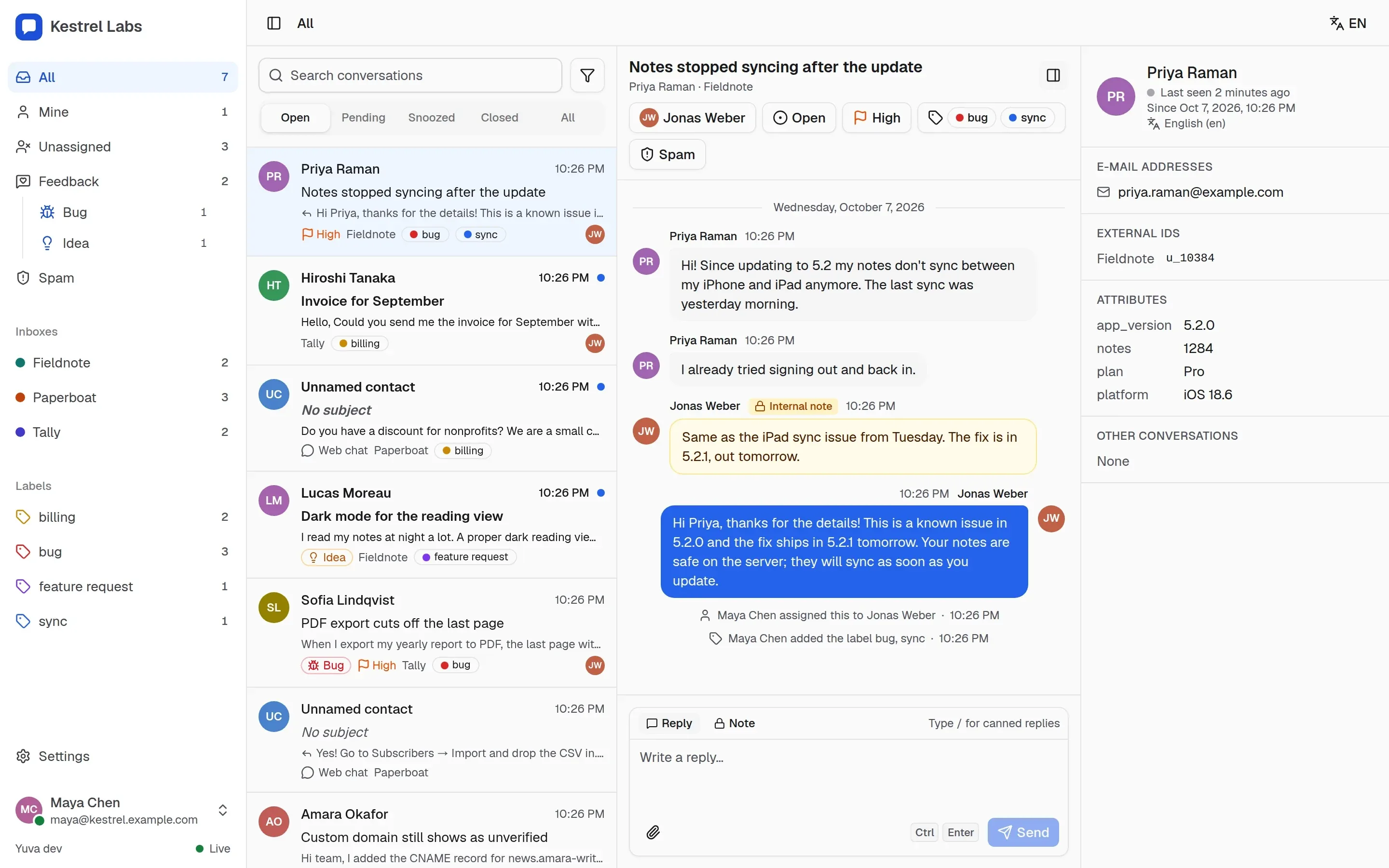
Yuva gives all of it one home: every product is an inbox, every channel lands in the same conversation model, and the whole team answers from one panel on servers you control.
How it works
Messages come in on any channel. Your team answers in one place.
Each message becomes part of a conversation in an inbox, and members answer from the panel. Yuva tells your backend what happened through signed webhooks, so your own apps can send their push notifications.
Connect your products
Create one inbox per product and give it channels: a support address, a chat widget, an app key, an API.
Answer from one panel
Conversations from every channel share one list, one thread view and one set of tools. Members see only the inboxes they were given.
Let your backend react
Signed webhooks tell your backend about new messages, so it can push a reply to a closed app with the keys it already has.
Channels
Every channel, one conversation model.
Live chat and asynchronous messaging differ only in settings. Whatever channel a conversation starts on, it looks and works the same in the panel, and each inbox chooses live or async.
E-mailE-mail done properly
Point a support address at Yuva through a Cloudflare Email Worker, any MTA or a signed HTTP request. Replies go out through each channel's own SMTP account: SES, Postmark or your own relay.
- Threads follow In-Reply-To and References, and replies find their conversation even when a mail client drops the headers.
- Quotes and signatures are stripped from what you read; the full text, sanitized HTML and the original message are kept.
- Catch-all addresses per domain, and local+tag addresses that reach their channel.
- Loop protection: auto-replies, bulk mail and Yuva's own messages never trigger another automatic message.
- Bounces from delivery reports and Amazon SES mark an address undeliverable.
Live chatLive chat and embedded threads
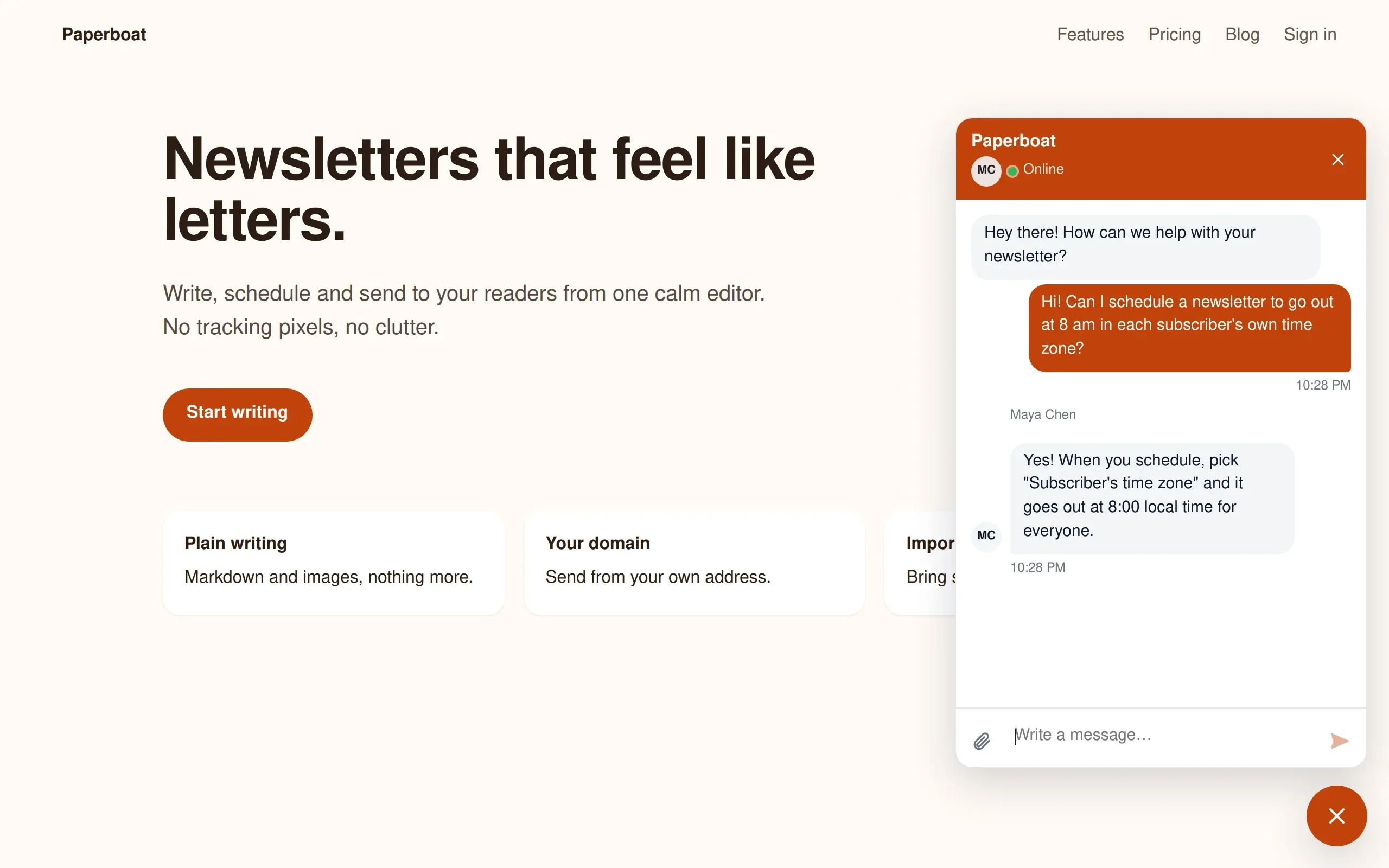
One web component loaded by one script tag. Use it as a floating launcher on a website, or embed a conversation thread inside your own product's panel.
- Shadow DOM: your styles stay out, the widget's styles stay in.
- Presence, typing and read receipts in live inboxes; an expected reply time in async ones.
- When the visitor has left, unread replies follow them by e-mail, and their answer continues the same conversation.
- Anonymous visitors, or signed-in users through an identity token from your backend.
- English and Turkish, left-to-right and right-to-left.
In-appIn-app messaging and feedback
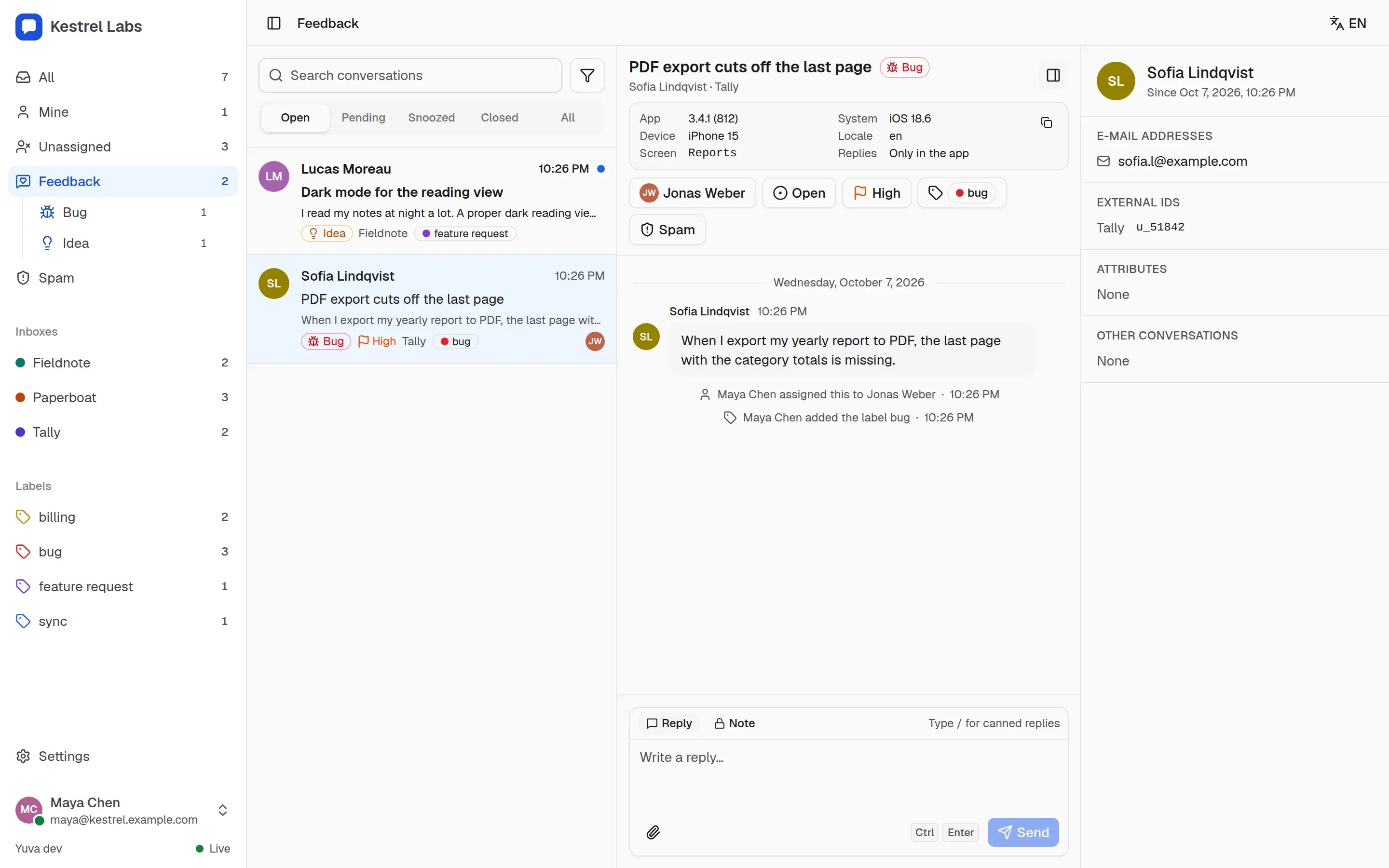
Native SDKs for iOS (YuvaKit, SwiftUI) and Android (Kotlin, Jetpack Compose) give your app a conversation list, threads with attachments and a feedback form, or a headless client for your own interface.
- Feedback with a category (bug, idea, praise, other), screenshots and device details: app version, build, system, device and screen.
- The panel filters feedback by category and counts what is still open.
- Users write as themselves through a short-lived token signed by your backend; Yuva never sees your user database.
- Push stays yours: Yuva sends a webhook, your backend sends the notification through APNs or FCM.

And an API for everything else
The team panel
Built for the people who answer.
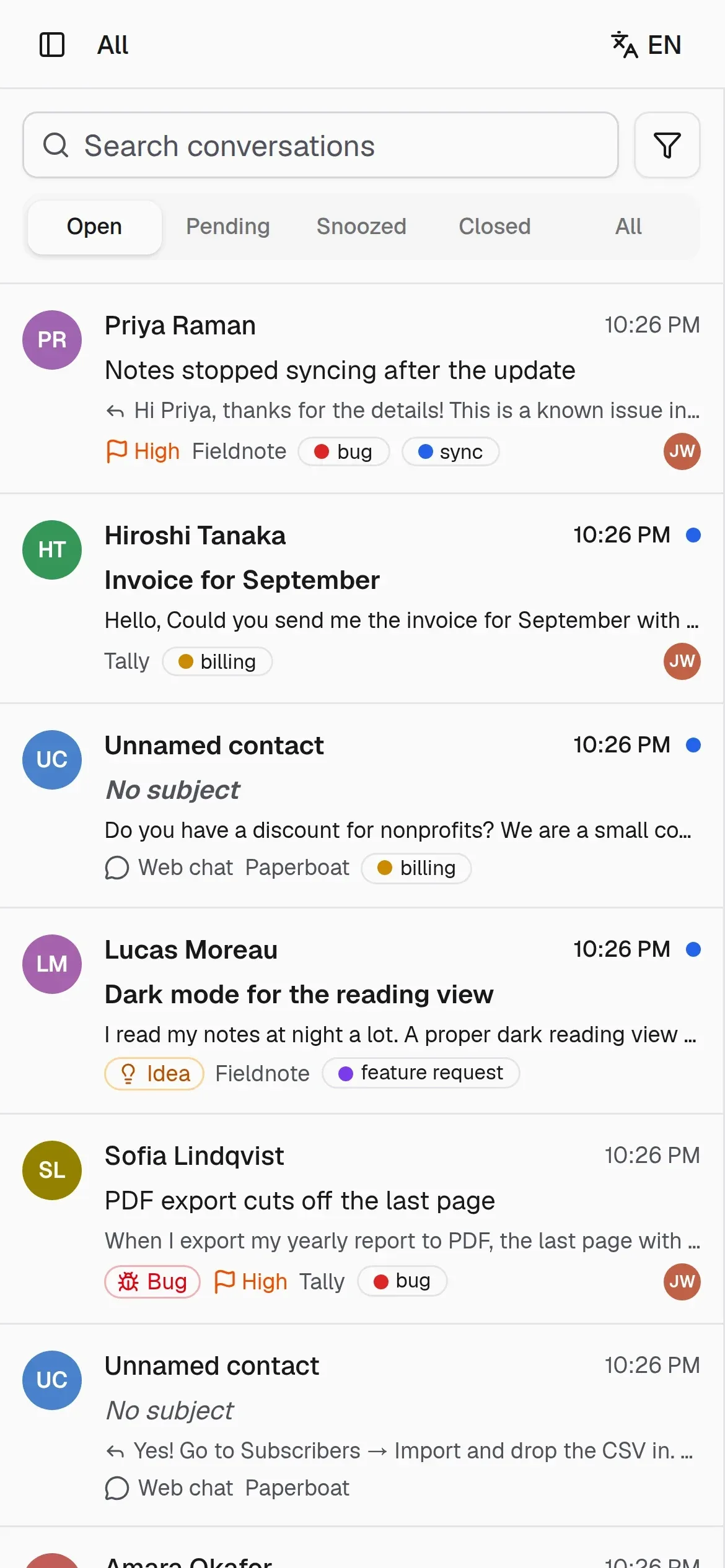
The panel ships inside the binary. It is fast, made for the keyboard, and works on phones as an installable app.
- Shared inbox
- All, mine, unassigned, per inbox and per label; open, pending, snoozed and closed.
- Assignment
- Assign conversations, set priority and hand over; every change is recorded in the thread.
- Internal notes
- Notes sit next to the replies and never reach the contact.
- Labels and canned replies
- Label conversations and insert saved answers by typing / in the composer.
- Search
- Full-text search across conversations, built on Postgres.
- Realtime
- New messages, typing and teammates' changes appear live over WebSocket.
- Notifications
- Install the panel as an app and get Web Push on phones and desktops, with e-mail as a fallback.
- Keyboard first
- Move through the list, reply, write notes and search without reaching for the mouse.
- Contact context
- Name, addresses, your own user id, attributes such as plan or app version, and earlier conversations.
- No passwords
- Sign in with an e-mailed code or a passkey. There is no open sign-up; everyone is invited.
- Roles and access
- Owners, admins and agents; agents see only the inboxes they were given.
- Turkish and English
- The panel, widget and SDKs speak both, and every member picks their own language.
For developers
Made to be embedded in your products.
Yuva is built for teams that make their own software. Every surface has a typed contract and a small, documented integration.
OpenAPI 3.1 contract
Identity tokens
Standard Webhooks
Your users stay yours
Website: the chat widget
<script src="https://support.example.com/yuva.js" defer></script>
<yuva-chat channel="yuva_pk_xxxxxxxxxxxxxxxx"></yuva-chat>
Your backend: an identity token in Go
import "github.com/productdevbook/yuva/sdk/go/identity"

token, err := identity.Sign(os.Getenv("YUVA_IDENTITY_SECRET"), identity.Claims{
	Subject:       user.ID,
	Email:         user.Email,
	EmailVerified: user.EmailConfirmed,
	Name:          user.Name,
	Attrs:         map[string]any{"plan": user.Plan},
})
iOS: YuvaKit and SwiftUI
import YuvaKit

let yuva = YuvaClient(configuration: YuvaConfiguration(
    serverURL: URL(string: "https://support.example.com")!,
    channelKey: "yuva_pk_xxxxxxxxxxxxxxxx",
    identityToken: { try await MyAPI.yuvaIdentityToken() }
))

YuvaConversationsView(client: yuva, openConversationId: $openConversationId)
Android: Kotlin and Compose
val yuva = YuvaClient(
    context,
    YuvaConfiguration(
        serverUrl = "https://support.example.com",
        channelKey = "yuva_pk_xxxxxxxxxxxxxxxx",
        identityToken = { myApi.yuvaIdentityToken() },
    ),
)

YuvaConversationsView(client = yuva, openConversationId = conversationId, onClose = { finish() })
Webhooks: verify the signature
import "github.com/productdevbook/yuva/sdk/go/webhook"

body, _ := io.ReadAll(io.LimitReader(r.Body, 1<<20))
if err := webhook.Verify(os.Getenv("YUVA_WEBHOOK_SECRET"), r.Header, body, 5*time.Minute); err != nil {
	http.Error(w, "bad signature", http.StatusUnauthorized)
	return
}Self-hosting
Yours to run, on one small server.
Yuva is one Go binary and a Postgres database. The job queue, realtime events and search all live in Postgres, so there is nothing else to operate.
One Docker image
Postgres 16 or newer
Files where you want them
Easy to watch
Pull the image
Pull the published image from GitHub Container Registry; it is built for linux/amd64 and linux/arm64.
docker pull ghcr.io/productdevbook/yuva:0.0.1- Open the install guide
Write compose.yaml and .env
Copy both files from the install guide: Postgres, your public URL, a master key, an ingress secret and an SMTP account.
Start it
Add a Web Push key pair, start the stack, and check that it is ready. Migrations run on start.
docker run --rm ghcr.io/productdevbook/yuva:0.0.1 vapid-keys >> .env docker compose up -d curl -s http://127.0.0.1:8080/readyz # {"status":"ok"}Create the first owner
There is no open sign-up. Create the workspace and its owner, sign in with the code that arrives by e-mail, and invite your team.
docker compose exec yuva /yuva bootstrap --email you@example.com --workspace "Example" --name "Your Name"
Put it behind a TLS reverse proxy that passes WebSockets; Caddy works as it is. The install guide also covers nginx, backups, upgrades and every setting. Operations guide
Security and privacy
Careful with what it holds.
A support inbox holds other people's words. Yuva is built with that in mind, and says plainly that it has not had an independent security audit yet.
Untrusted mail stays inert
Signed ingress
No requests into your network
Origin checks
Passkeys and encrypted secrets
Data you can delete
Found a vulnerability? Report it privately through GitHub, not in a public issue. Security policy
Open source and licensing
Open source, and meant to stay that way.
Yuva uses a split license: the server stays open, and the pieces you embed in your own apps carry no copyleft obligations.
Server and panel
SDKs and API contract
Contributor License Agreement
The name and logo
Why this split?
Status and roadmap
Where it stands today.
Yuva is pre-alpha and built in the open. Versions start at 0.0.1, there is no 1.0 until the project is ready, and the first release, 0.0.1, is out now.
- Done
Foundation
Go server, OpenAPI contract, migrations, job queue and CI.
- Done
Core model and sign-in
Workspaces, roles, inboxes, channels, contacts, conversations, API keys, codes and passkeys.
- Done
Team panel
List, search, threads, notes, labels, canned replies, realtime updates, Turkish and English.
- Done
E-mail
Inbound through a Worker or any MTA, threading, quote stripping, SMTP, loop protection and bounces.
- Done
Web widget
Live chat, embedded threads, identity tokens, presence and e-mail continuity.
- Done
Mobile SDKs, feedback and webhooks
iOS and Android, feedback with device details, Standard Webhooks.
- Done
Member notifications
Installable panel, Web Push, preferences per event and inbox, e-mail fallback.
- Done
First public release, 0.0.1
Tagged v0.0.1 with its Docker image on GitHub Container Registry, after hardening sign-in, client sessions, ingress and attachment handling.
- In progress
First real use
Running real support for a set of products on Yuva alone.
Later: a Helm chart and optional push sent by Yuva itself. Not planned for now: a CRM, marketing e-mail, a public knowledge base or social-media channels. Full roadmap
FAQ
Questions people ask.
Something missing? Open an issue on GitHub.
Not yet. It is pre-alpha: the API and the database schema can change without migration paths, and the code has not had an independent security audit. Try 0.0.1 with test data and watch the repository for the next releases.
Yuva is built for one team that runs many products: each product is an inbox with its own branding, channels and members, all answered from one panel. You host it yourself, there is no per-seat pricing, and it stays small: one binary and Postgres.
A host with Docker, Postgres 16 or newer, an SMTP account for sign-in codes and notifications, and a host name with TLS behind a reverse proxy that passes WebSockets. Attachments go on a volume or into an S3-compatible bucket.
Yuva does not listen for SMTP. Mail reaches it through the included Cloudflare Email Worker, through the yuva ingest-email command from Postfix or any other MTA, or as a signed HTTP request.
Your backend does. Yuva sends a signed message.created webhook that says whether the user is online; your backend sends the push through APNs or FCM with the keys it already has, and the SDKs open the right conversation when it is tapped. Your team gets Web Push from the panel.
Yes. The SDKs and the API contract are MIT. Only the server and the panel are AGPL, and that matters when you modify them and offer them to others as a network service.
The panel, the widget and the mobile SDKs ship in English and Turkish. Every inbox has its own default language, and the widget also handles right-to-left layouts.
Inside your own company, modified or not, yes. Offering a hosted service or a product under the Yuva name needs written permission; a renamed fork that keeps the AGPL is always allowed.
Give every product's users a way to reach you.
Read the code, run 0.0.1 on your machine, and follow along as it grows.